Deputy vs When I Work
Staff scheduling, employee scheduling, pricing & key differences for 2026
Deputy and When I Work both cover the essentials of staff scheduling, but they emphasize different levels of workforce complexity. Deputy layers scheduling with labor-law guardrails, demand forecasting, wage budgets, auto-scheduling and deeper workforce controls. When I Work starts at a lower entry price and centers on straightforward scheduling, OpenShifts, shift swaps, team messaging and multi-location scheduling for hourly teams.
Deputy and When I Work are established options for businesses replacing spreadsheets, group texts and manual shift calendars. Both support hourly and shift-based workforces, but their pricing, advanced scheduling controls and workforce-management depth differ.
Deputy vs When I Work: quick comparison
| Category | Deputy | When I Work |
|---|---|---|
| Starting price | $5/user/month for Lite | $2.50/user/month for Essentials |
| Free trial | Up to 31 days; no credit card required | 14 days; no credit card required |
| Staff scheduling | Basic through advanced scheduling, auto-scheduling and micro-scheduling by plan | Auto-scheduling, templates, multi-week and multi-location scheduling |
| Shift flexibility | Shift swaps, replacements, leave and availability | OpenShifts, shift swaps, time off and callouts |
| Labor forecasting | Demand forecasting, wage budgets and labor optimization on Core | Forecast tools; custom unit forecasting on Pro |
| Compliance | Labor-law compliance and advanced compliance controls | Scheduling rules, overtime/labor controls and attendance workflows |
| Enterprise controls | Pro includes SSO, location hierarchies, custom access and sandbox | Premium includes API access, webhooks and SAML/SSO |
Pricing and packaging were checked against vendor information in October 2026 and can change.
Deputy vs When I Work pricing
Deputy pricing
Deputy lists Lite at $5 per user per month, Core at $6.50 and Pro at $9. Lite includes basic scheduling, timesheets, time clocking, labor-law compliance, shift swaps, leave and availability, reporting, messaging and payroll/HR integrations. Core adds advanced scheduling, auto-scheduling, demand forecasting, labor optimization, wage and labor budgets and more advanced compliance. Deputy also lists a $30 minimum monthly spend for its monthly Lite, Core and Pro plans.
When I Work pricing
When I Work lists Essentials at $2.50 per user per month, Pro at $5 and Premium at $8. Essentials includes auto-scheduling, multi-week scheduling, multi-location scheduling, templates, forecasting, messaging, OpenShifts and shift swapping. Pro adds advanced scheduling rules, permissions, labor sharing, custom forecasting and reporting. Premium adds API access, webhooks and SAML/SSO.
Pricing context: the starting price is only one part of the comparison. Teams should map the exact forecasting, compliance, time-and-attendance, integration and enterprise controls they need to the relevant tier.
Staff and employee scheduling
Deputy lets managers build schedules around availability, qualifications, demand and labor budgets. Its higher-tier scheduling tools include auto-scheduling, micro-scheduling and demand forecasting, which can be useful when staffing requirements change by role, location or expected business volume.
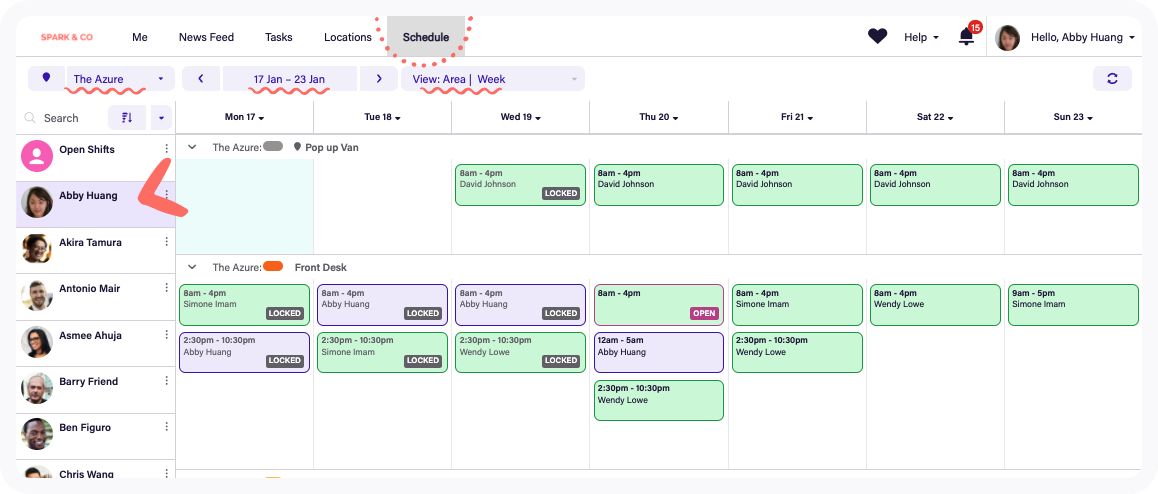
When I Work focuses heavily on making routine shift scheduling fast. Managers can use auto-scheduling, reusable templates, multi-week schedules and multi-location schedules, while employees can see schedules, request time off, swap shifts or claim OpenShifts through the app.
Labor forecasting, budgets and compliance
This is one of the clearer differences in product emphasis. Deputy Core includes demand forecasting, labor optimization, wage and labor budgets and advanced labor-law compliance. Deputy can use demand signals such as sales to help managers align staffing with expected business activity.
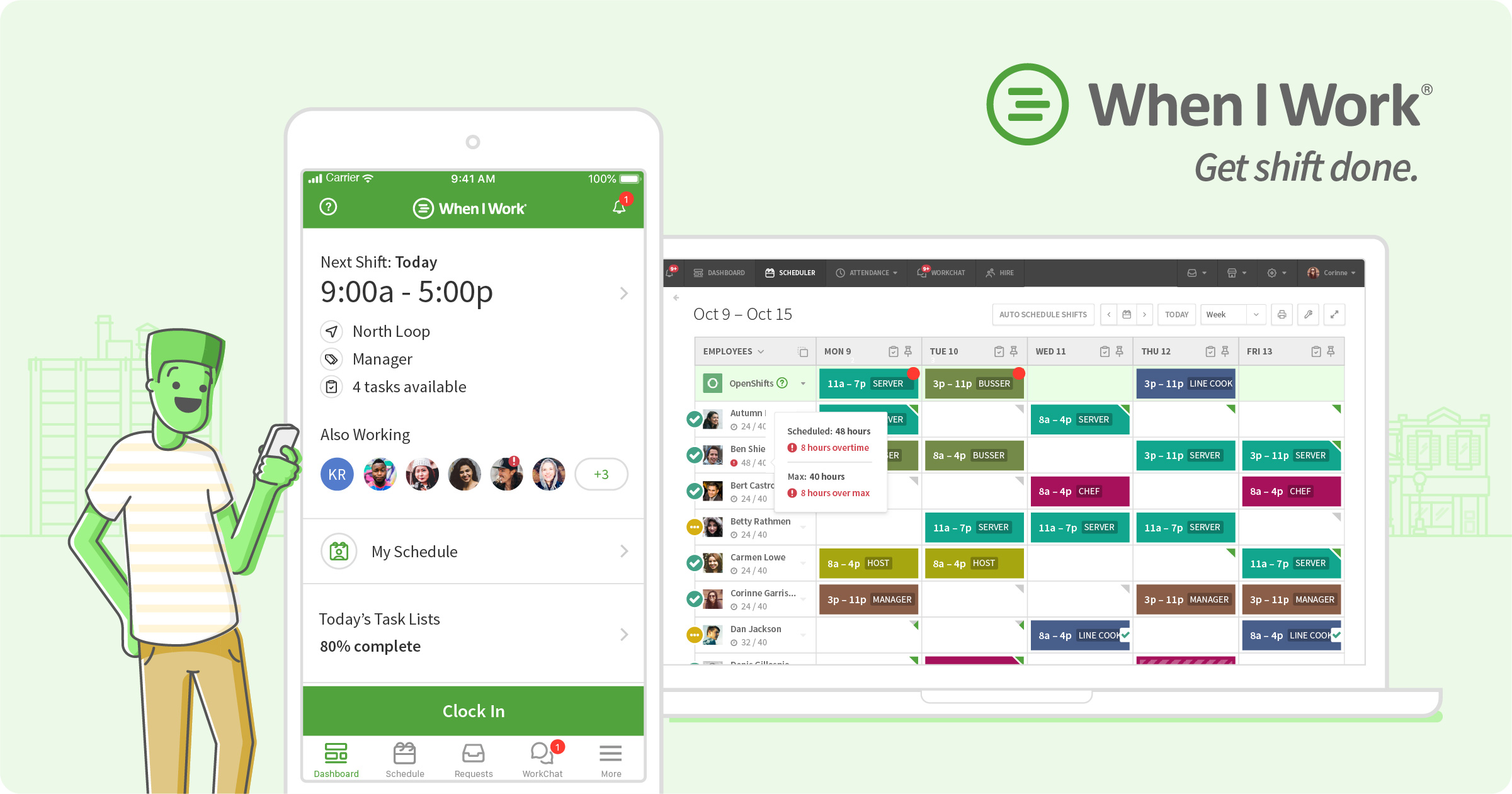
When I Work also provides labor forecasting and warns managers about staffing and overtime considerations while schedules are being built. Pro adds custom unit forecasting and scheduling rules. Businesses with complex wage-and-hour requirements should compare their specific rules against each product’s plan-level capabilities rather than relying on a generic compliance label.
Time tracking and attendance
Deputy combines scheduling with timesheets and time clocks, with more advanced time-clock and timesheet automation available on higher plans. Its workforce data can flow into payroll and HR integrations, while Deputy Payroll is available as a separate U.S. add-on on eligible plans.
When I Work connects scheduling with time and attendance so scheduled hours, worked hours and attendance data stay in the same workforce workflow. Its current pricing experience also allows buyers to configure Time Tracking & Attendance alongside scheduling plans.
Shift swaps, OpenShifts and employee self-service
Both products reduce manager back-and-forth by giving employees more control over routine schedule changes. Deputy supports shift swapping, replacement workflows, leave and availability management. When I Work emphasizes OpenShifts and shift swapping, allowing workers to pick up or exchange eligible shifts while managers retain approval controls.
Multi-location and growing teams
Deputy offers location-aware scheduling and expands into location hierarchies, custom access levels and SSO on Pro. Its forecasting and labor controls can also help organizations standardize scheduling practices across sites.
When I Work includes multi-location scheduling in Essentials and adds labor sharing and more advanced controls on Pro. Premium introduces API keys, webhooks and SAML/SSO for organizations that need deeper technical administration.
Which platform fits different requirements?
Deputy may fit requirements such as:
- Demand-based staffing and labor forecasting are important.
- You need wage/labor budgets tied closely to schedule building.
- Labor-law guardrails and advanced compliance controls are central requirements.
- You need micro-scheduling, advanced workforce reporting or deeper location controls.
When I Work may fit requirements such as:
- You want a lower starting price for core shift scheduling.
- OpenShifts, shift swapping and mobile employee self-service are priorities.
- You need straightforward scheduling, messaging and multi-location coordination.
- Your technical requirements may eventually include API access, webhooks or SAML/SSO.
Questions to ask before choosing
- How many employees and locations will use the system?
- Do schedules need to react to sales, demand or labor budgets?
- Which wage-and-hour compliance rules apply to your workforce?
- Do employees need self-service shift swaps and open shifts?
- Do you need a time clock and attendance alongside scheduling?
- Which tier contains your required reporting, SSO and integration controls?
- What will the full annual cost be after add-ons and minimum charges?
Frequently asked questions
How much does Deputy cost?
Deputy currently lists Lite at $5, Core at $6.50 and Pro at $9 per user per month in the U.S., excluding applicable taxes. Its monthly Lite, Core and Pro plans have a $30 minimum monthly spend.
How much does When I Work cost?
When I Work currently lists Essentials at $2.50, Pro at $5 and Premium at $8 per user per month. Buyers should confirm the final configuration for scheduling and time-and-attendance requirements.
Do Deputy and When I Work support auto-scheduling?
Yes. Both offer auto-scheduling. Deputy’s Core plan adds demand forecasting and labor optimization, while When I Work includes auto-scheduling in Essentials and adds more advanced scheduling controls on Pro.
Can employees swap shifts?
Yes. Both support employee-driven shift changes. Deputy includes shift swaps and replacement workflows, while When I Work supports shift swapping and OpenShifts.
Which products support multiple locations?
Both can manage multi-location workforces. Their higher plans add different controls for labor sharing, location structures, permissions and enterprise administration.
Do they include time tracking?
Deputy includes basic timesheets and time clocking in Lite, with more advanced controls on higher tiers. When I Work offers integrated time-and-attendance capabilities alongside its scheduling platform.
Related staff scheduling guides
Continue comparing staff scheduling platforms with our related Software Finder guide: 7shifts vs Homebase (2026): Employee Scheduling, Pricing & Key Differences.
Or browse more options in the KolApp Software Finder.
Research note: Product features and pricing were checked against current vendor information in October 2026. Vendors can change plans, pricing and packaging at any time.