
Verwick
Home › Software › Microsoft Teams
Collaboration

Microsoft Teams

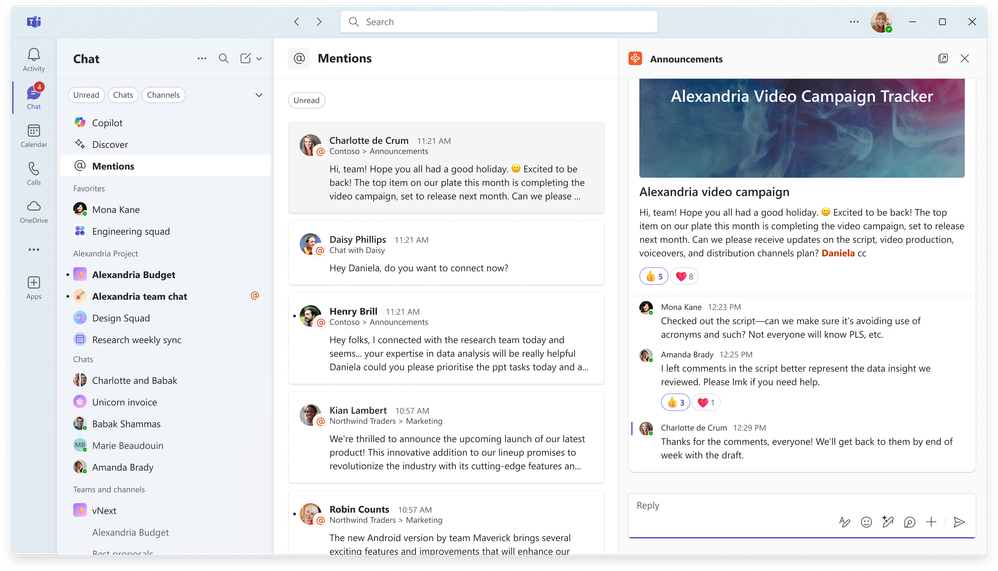
Microsoft Teams combines team messaging, workplace collaboration, video conferencing, online meetings and calling with Microsoft 365. Teams Essentials is listed at US$4 per user per month with annual billing, offering meetings for up to 300 participants, chat, recordings and 10 GB of storage per user. Certain Microsoft 365 business bundles also include Teams, depending on licensing.

Microsoft Teams Overview

Verwick Scores

Verwick Software Scorecard

AI-researched by Verwick using verified public product signals — independent from user-review ratings.
Popularity 99%
Ease of Use 82%
Features 96%
Value 92%
Integrations 98%
✦ Verwick Insight

Our quick take on Microsoft Teams

Microsoft Teams joins persistent business messaging, video meetings and Microsoft 365 collaboration. It is most attractive to organizations invested in Outlook, SharePoint and OneDrive, though Teams licensing and Microsoft 365 bundle differences should be reviewed before purchase.
Verwick / Software researchUpdated 2026-11-21

Microsoft Teams: what you need to know

Microsoft Teams is best suited to organizations already using Microsoft 365. Its advantage is connected chat, meetings, Outlook calendars and SharePoint files; the trade-off is licensing complexity and separate calling requirements. Compare the exact Teams-inclusive bundle and Teams Phone costs before choosing it over Slack or Zoom.

Best for
Microsoft 365 collaboration, meetings and file sharing
Pricing
Per user month

Compare Microsoft Teams plans

Confirm whether Teams is included in the chosen Microsoft 365 plan; test guest access, file permissions and calling requirements.

Where it fits

Microsoft 365 collaboration, meetings and file sharing

Integration details1 notes

Native Microsoft 365 collaboration includes Outlook, OneDrive and SharePoint. Verify third-party app permissions and tenant policy.

Research based on published materials, not hands-on testing.

Starting Price
4
Free Trial
Yes
Best For
Organizations using Microsoft 365 that need integrated chat, meetings, files and collaboration in one workspace.
Pricing Model
Per User Month
Company Size
1–5, 6–20, 21–50, 51–200, 201–1,000, 1,000+
Category
Collaboration

Microsoft Teams Features

Task Management Automation Ai

Industries

It Software Consulting Professional Services Marketing Agencies

Microsoft Teams Pricing

Starting price: 4

Pricing model: Per User Month

Free trial: Yes

Microsoft Teams Integrations

Outlook Outlook Calendar Microsoft 365 Onedrive Sharepoint Asana Salesforce

Microsoft Teams Pros & Cons

Pros

  • Strong Microsoft 365 integration for calendar, files and team workspaces.
  • Meeting, chat and collaboration in one product.
  • Entry business plan has a published per-user price.

Cons

  • Plan inclusion and licensing can be confusing across Microsoft 365 bundles.
  • Some advanced voice, compliance and AI functions cost extra.
  • Teams Essentials is not the full Microsoft 365 desktop productivity suite.

Alternatives to Microsoft Teams

Not sure which software fits your team?

Compare software based on your team size, industry, features, and requirements.

Find Software
Questions & Answers

Microsoft Teams FAQ

Why might Teams be missing from a Microsoft 365 Business subscription?
Microsoft offers Teams-inclusive and Teams-excluded Microsoft 365 bundles in some markets. Check the exact SKU and region before buying; the Microsoft 365 name alone does not establish whether Teams is included.
Can Teams Essentials replace a full Microsoft 365 business plan?
Essentials focuses on meetings and collaboration, not the complete desktop Office application bundle. Compare your requirements for Outlook, Word, Excel and SharePoint before choosing.
Will external guests see every SharePoint file shared through Teams?
Not automatically. Teams guest-access policies and the underlying SharePoint site permissions both matter. Test a guest account and a private channel before inviting outside partners.
Does Teams Essentials include calling regular telephone numbers?
Do not assume PSTN calling is included. Teams Phone, calling plans and regional availability can require separate licenses.
What changes when migrating from Slack to Teams?
Channel structures, historical messages, files, integrations and identity permissions all need mapping. Pilot a department and verify migration-tool limitations before promising a complete transfer.
When is Zoom still useful alongside Teams?
Organizations running specialized webinars, events or established external-client workflows may keep Zoom. Compare meeting capacities and event features against the cost of maintaining two platforms.

Last fact-checked Nov 21, 2026. Sources: Microsoft Teams business plans · Microsoft Teams documentation