
Compare leading options, buyer considerations and key differences for 2026.
The strongest option depends on your organization’s requirements, budget and existing stack. Start by comparing HubSpot CRM, Pipedrive, Salesforce Sales Cloud, Zoho CRM, then test the workflows that matter most to your team rather than choosing from a feature checklist alone.

Sales Pipeline Software should be evaluated around pipeline visibility, activity tracking, automation, forecasting, reporting, email integration, customization and ecosystem fit. Packaging changes frequently, so shortlist products based on the workflows you actually need and verify material purchasing details with each vendor.
| Software | What stands out | Good evaluation fit |
|---|---|---|
| HubSpot CRM | Pipeline management tied to marketing, service and broader customer-platform capabilities. | Teams prioritizing depth and scale |
| Pipedrive | Sales-focused CRM built around visual pipelines, activities and deal progression. | Teams prioritizing focused workflows |
| Salesforce Sales Cloud | Highly extensible enterprise CRM with deep automation, reporting and ecosystem breadth. | Organizations wanting broader platform coverage |
| Zoho CRM | Flexible CRM and pipeline management that connects into the wider Zoho business suite. | Buyers wanting another strong fit to compare |
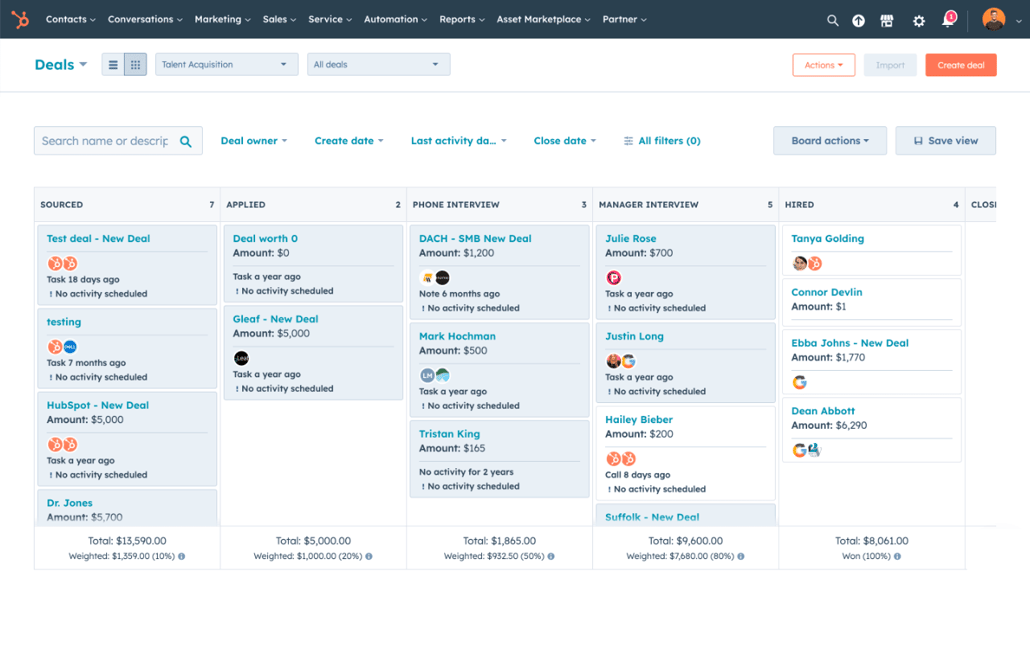

Pipeline management tied to marketing, service and broader customer-platform capabilities. When evaluating HubSpot CRM, verify current pricing, plan limits, implementation requirements, integrations and support directly with the vendor.
Sales-focused CRM built around visual pipelines, activities and deal progression. When evaluating Pipedrive, verify current pricing, plan limits, implementation requirements, integrations and support directly with the vendor.
Highly extensible enterprise CRM with deep automation, reporting and ecosystem breadth. When evaluating Salesforce Sales Cloud, verify current pricing, plan limits, implementation requirements, integrations and support directly with the vendor.
Flexible CRM and pipeline management that connects into the wider Zoho business suite. When evaluating Zoho CRM, verify current pricing, plan limits, implementation requirements, integrations and support directly with the vendor.
A pipeline tool should match how opportunities actually progress, not force every company into the same stages. Test lead capture, qualification, activities, email/calendar sync, stage rules, forecasting, reporting, automation and manager visibility using a real opportunity.
HubSpot CRM is compelling when sales needs to connect closely with marketing and service on one platform. Pipedrive emphasizes a visual, sales-focused pipeline and is often easier for teams that want less platform complexity. Salesforce Sales Cloud provides extensive configurability and ecosystem depth for organizations prepared to administer it. Zoho CRM offers broad CRM capabilities and becomes especially relevant for companies already using other Zoho applications.
Have actual reps create, update and advance opportunities during the evaluation. Measure clicks, required fields, mobile usability and whether managers can get a trustworthy forecast without chasing the team for spreadsheet updates.
Build a short requirements list before booking demos. Separate must-have requirements from conveniences, then score each product against the same real workflow. For this category, pay particular attention to pipeline visibility, activity tracking, automation, forecasting, reporting, email integration, customization and ecosystem fit. Ask vendors to demonstrate those requirements with realistic data rather than relying on roadmap promises.
Pricing should be modeled as total cost rather than the headline subscription. Include implementation, onboarding, add-ons, usage limits, premium integrations, support tiers and the internal cost of migration. For quote-based products, give each vendor the same user counts and requirements so proposals are comparable.
Use Verwick Software Finder to browse software profiles, categories, alternatives, pricing information and integrations. Compare products against your own requirements before making a purchasing decision.