
WBS in Project Management: What It Is + Examples
A work breakdown structure turns a large project into smaller, manageable deliverables. Learn how a WBS works, see practical examples, and build one that connects directly to your project schedule.
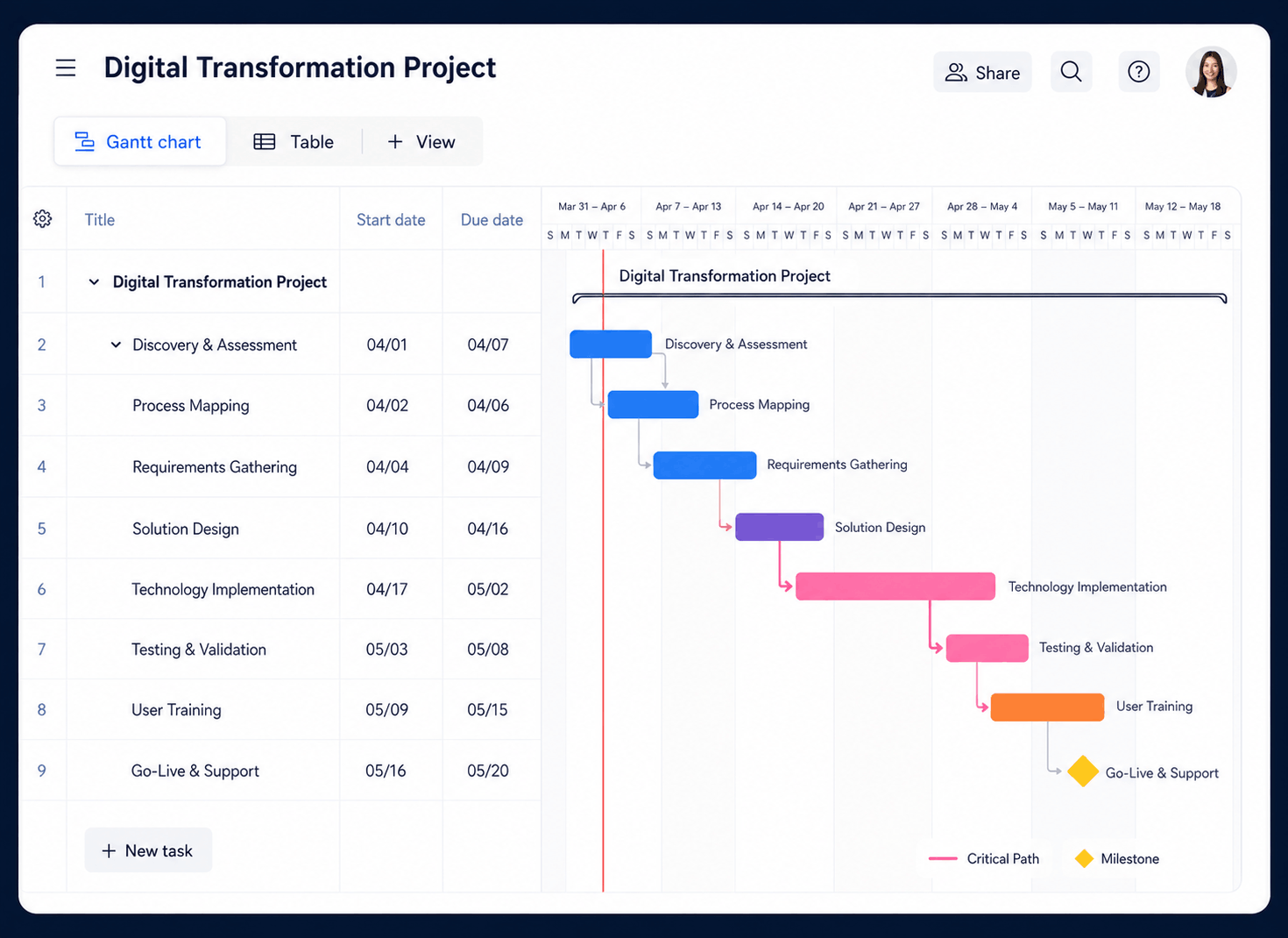
A work breakdown structure (WBS) is a hierarchical breakdown of a project’s total scope into smaller deliverables and work packages. It shows what the project must produce—not necessarily the order or exact dates in which the work will happen.
What is a WBS in project management?
A work breakdown structure organizes the entire scope of a project into a visual hierarchy. The finished project sits at the top. Beneath it are major deliverables or phases, followed by smaller components, until the work is specific enough to estimate, assign, schedule, and monitor.
Think of a WBS as a map of everything the project must deliver. A website redesign, for example, can be broken into discovery, design, development, content, testing, and launch. Each of those branches can then be divided into smaller deliverables such as wireframes, page templates, content migration, browser testing, and deployment.
Once the scope has been decomposed, project managers can turn the lowest-level work packages into tasks inside project management software, connect dependencies, estimate resources, assign owners, and build the project schedule.
The four common levels of a WBS
A WBS can contain more or fewer levels depending on project complexity. Most practical structures move through these four layers:
Project
The complete outcome, such as “CRM Implementation” or “Office Relocation.”
Major deliverables
The largest components, phases, systems, or outputs required for success.
Sub-deliverables
Smaller results that combine to complete each major deliverable.
Work packages
The lowest controlled units that can be estimated, owned, scheduled, and tracked.
The lowest level does not have to mean a tiny task. It means the lowest level at which the project team wants formal control. A useful work package has a clear output, owner, estimated effort or cost, acceptance criteria, and enough detail to measure completion.
Deliverable-based vs. phase-based WBS
| Structure | How it organizes work | Example branches | Best used when |
|---|---|---|---|
| Deliverable-based WBS | Groups work around the products, systems, or outcomes the project must create. | Customer portal, data migration, training program | Outputs are clearly defined and may progress in parallel. |
| Phase-based WBS | Groups work around lifecycle stages or a standard delivery methodology. | Initiation, planning, execution, testing, closure | The project follows a predictable sequence or governance process. |
| Hybrid WBS | Uses phases at one level and deliverables beneath them—or the reverse. | Design → mobile experience, desktop experience | Teams need both lifecycle visibility and deliverable ownership. |
A deliverable-based structure is often clearer because it focuses attention on completed outcomes instead of activities. However, there is no requirement that every project use the same format. Choose the structure that makes scope easiest to understand, estimate, and control.
Work breakdown structure examples
These simplified examples demonstrate how different teams can decompose project scope. The final level can be converted into tasks, milestones, or summary groups in a Gantt chart.
Software implementation WBS
- 1.0 Planning: requirements, stakeholders, project plan
- 2.0 Configuration: environments, permissions, workflows
- 3.0 Data: mapping, cleansing, migration, validation
- 4.0 Testing: system, integration, security, UAT
- 5.0 Launch: training, deployment, hypercare
Website redesign WBS
- 1.0 Discovery: goals, analytics, content inventory
- 2.0 UX: sitemap, user flows, wireframes
- 3.0 Design: style system, page mockups, assets
- 4.0 Development: templates, components, integrations
- 5.0 Launch: QA, redirects, deployment, monitoring
Marketing campaign WBS
- 1.0 Strategy: audience, goals, offer, channels
- 2.0 Creative: messaging, design, landing pages
- 3.0 Production: ads, email sequences, social posts
- 4.0 Launch: setup, approvals, publishing
- 5.0 Analysis: reporting, optimization, retrospective
Construction project WBS
- 1.0 Preconstruction: permits, design, procurement
- 2.0 Site work: clearing, excavation, utilities
- 3.0 Structure: foundation, framing, roofing
- 4.0 Systems: electrical, plumbing, HVAC
- 5.0 Completion: finishes, inspection, handover
Build tasks, milestones, dependencies, owners, and timelines in KolApp.
How to create a work breakdown structure
Clarify the final project outcome
Review the charter, objectives, requirements, exclusions, constraints, and acceptance criteria. Write the complete project outcome at the top of the WBS.
Identify major deliverables
List the high-level results needed to achieve the outcome. Ask, “What must be delivered for this project to be considered complete?”
Decompose each deliverable
Break every branch into smaller components. Continue until the team can reasonably estimate cost, duration, and resources and assign clear responsibility.
Create and code the work packages
Give each item a hierarchical identifier such as 2.3.1. The numbering makes scope elements easier to reference across schedules, budgets, risk logs, and reports.
Check the 100% rule
Confirm that child elements fully represent their parent deliverable, with no gaps or overlaps. Include project management, testing, documentation, training, and handover work where applicable.
Add details to the WBS dictionary
Document the description, owner, assumptions, acceptance criteria, constraints, cost estimate, and related milestones for each work package.
Convert work packages into the schedule
Define activities, durations, dependencies, milestones, and assignments. Use resource scheduling software to check whether the people needed by the plan are actually available.
Simple WBS template
Use this format to start a WBS workshop. Replace the placeholder names with project-specific outcomes, then continue decomposing only where more control is needed.
| WBS code | Element | Deliverable or work package | Owner | Completion criteria |
|---|---|---|---|---|
| 1.0 | Project | Complete project outcome | Project manager | All accepted deliverables complete |
| 1.1 | Major deliverable A | First high-level result | Workstream lead | Deliverable approved |
| 1.1.1 | Work package | Controlled unit of work | Named owner | Specific measurable condition |
| 1.2 | Major deliverable B | Second high-level result | Workstream lead | Deliverable approved |
| 1.2.1 | Work package | Controlled unit of work | Named owner | Specific measurable condition |
Turn each work package into trackable work with assignments, statuses, dates, and dependencies.
WBS vs. project plan vs. Gantt chart
| Tool | Primary question | What it contains | Relationship |
|---|---|---|---|
| Work breakdown structure | What must the project deliver? | Scope hierarchy, deliverables, work packages | Defines and organizes total scope |
| Project plan | How will the project be managed? | Scope, schedule, costs, resources, risks, communication, governance | Describes the full management approach |
| Gantt chart | When will the work happen? | Tasks, dates, durations, milestones, dependencies, progress | Schedules the work derived from the WBS |
The WBS is not the schedule, although the two should connect. The WBS defines the scope; the Gantt chart puts related activities on a timeline. That separation prevents teams from jumping into dates before agreeing on what must be delivered.
Schedule work packages, connect dependencies, assign resources, and monitor progress with KolApp’s Gantt view.
Common WBS mistakes to avoid
Microscopic work packages create administrative effort without improving control.
A WBS should organize scope and deliverables, not become an unstructured list of actions.
Include project management, testing, documentation, training, security, and handover.
Each scope element should have one clear place to avoid duplicate estimates and ownership.
Work packages need a shared definition of completion—not subjective “almost done” reporting.
Involve the people doing the work; they are most likely to identify missing scope and dependencies.
Frequently asked questions
What does WBS stand for in project management?
WBS stands for work breakdown structure. It is a hierarchical representation of the total project scope, divided into deliverables and manageable work packages.
What is the main purpose of a WBS?
The main purpose is to ensure that the complete project scope is visible and organized. It creates a reliable foundation for estimating cost and duration, assigning responsibility, planning resources, building the schedule, and tracking progress.
What is a work package in a WBS?
A work package is the lowest controlled component of the WBS. It should be small enough to estimate, assign, and track, but large enough that managing it does not create unnecessary overhead.
What is the 100% rule in WBS?
The 100% rule states that the WBS includes 100% of the work required to complete the project. The child elements beneath a parent must represent all of that parent’s scope, without overlaps or omissions.
Is a WBS the same as a Gantt chart?
No. A WBS organizes what the project must deliver. A Gantt chart schedules activities over time and shows dates, durations, progress, milestones, and dependencies. Teams commonly build the WBS first and use it to develop the Gantt chart.
How many levels should a WBS have?
There is no universal number. Use enough levels to create work packages that can be reliably estimated, assigned, and controlled. Small projects may need two or three levels, while complex programs may require more.