
Project Management Software With Resource Management
Plan the work and the people together. The right platform connects tasks, timelines, capacity, availability, workloads, resource costs and budgets so every project plan is built around what your team can realistically deliver.
What Is Project Management Software With Resource Management?
Project management software organizes the work: tasks, owners, due dates, dependencies, milestones, status updates and delivery timelines. Resource management software organizes the capacity required to complete that work: people, working hours, availability, skills, assignments, time off, utilization and cost.
Software that connects both disciplines gives managers one operating picture. A project manager can build a plan, assign work and immediately understand whether the assigned people have enough capacity across all their projects—not just the project currently open on the screen.
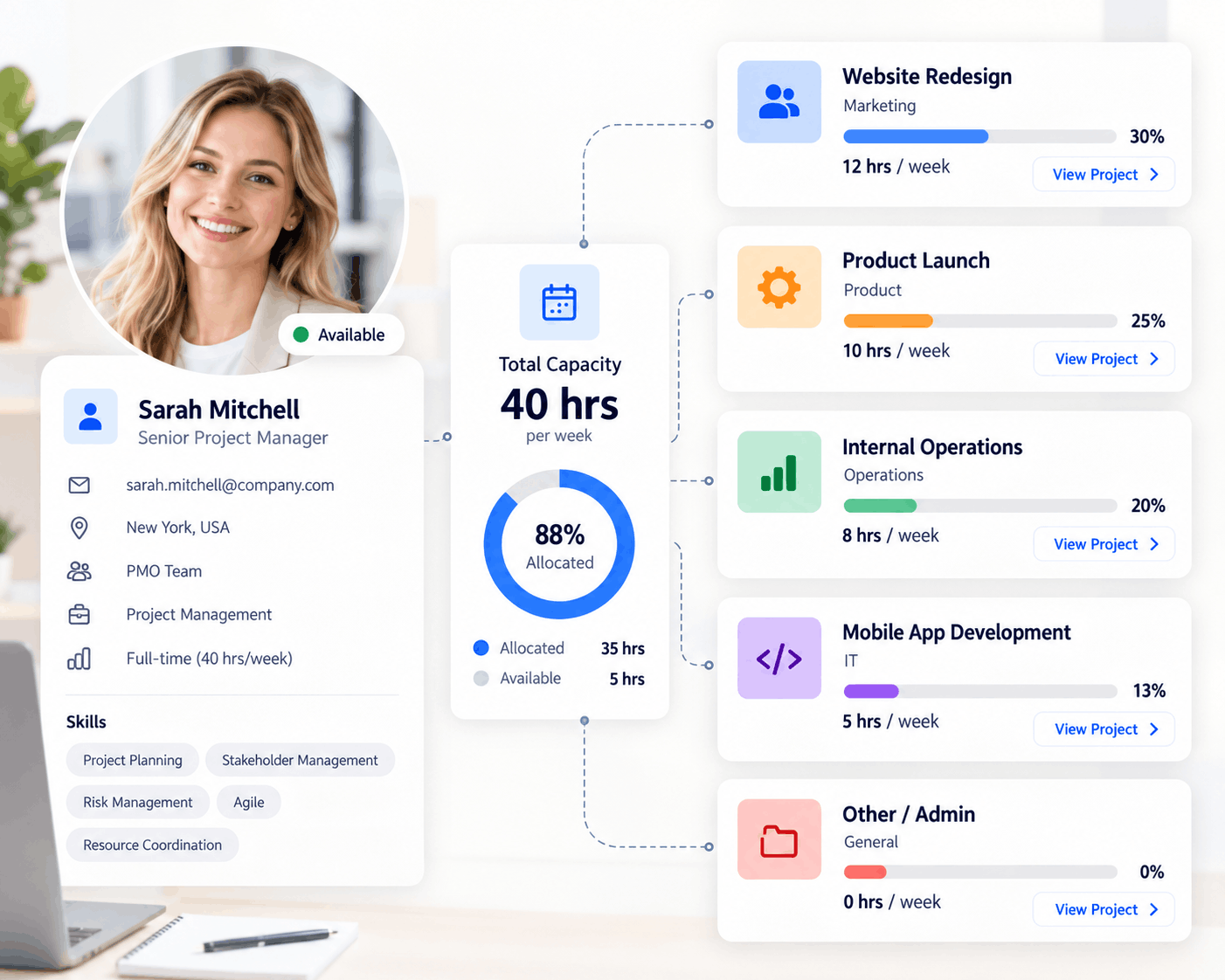
This is different from adding names to tasks. Assignment tells you who owns the work. Project resource planning tells you whether that person is available, how much of their capacity is already committed, which other projects compete for their time and what the allocation contributes to project cost.
Plan and execute the work
- Tasks and ownership
- Gantt timelines and dependencies
- Kanban workflows and statuses
- Milestones, risks and updates
- Project budgets and progress
Plan the capacity behind it
- Availability and working hours
- Capacity and demand
- Cross-project allocations
- Workload and utilization
- Time off, conflicts and resource costs
Why Project Management and Resource Management Belong Together
A project can look perfectly organized and still be impossible to deliver. The tasks may have owners. The Gantt chart may have dates. The milestones may appear achievable. But if the same engineer, designer or consultant is committed to several projects at once, the plan is based on capacity that does not exist.
This is the gap between a project schedule and a feasible delivery plan. When project and resource data live in separate tools, managers often discover the problem only after work begins:
- Several project managers book the same specialist during the same week.
- A task is assigned to someone who is on leave or already fully utilized.
- A deadline changes, but the resource schedule is not updated.
- New work is accepted without comparing demand against future capacity.
- Project hours and resource rates are disconnected from the cost forecast.
- Leadership sees project status but cannot see the staffing pressure behind it.
A connected platform turns resource planning into part of project planning. When the schedule changes, managers can assess the people, capacity and budget consequences before committing to the new plan. For teams running several initiatives at once, this becomes the foundation of reliable multi-project resource management.
A simple capacity example
Sarah has 40 working hours next week. Project Alpha needs 18 hours, Project Beta needs 16, and planned internal work needs 8. A task-only view shows three valid assignments. A connected resource view shows the real issue.
Essential Features to Look For
The platform should connect three layers: the work being planned, the people and capacity behind it, and the controls managers use to protect delivery. Use the filters to explore each layer.
Explore the connected workflow
Filter capabilities by the decision you need to make.
Plan the work
Turn scope and demand into a clear delivery plan.Project planning
Build tasks, milestones and dates using grid, Gantt and Kanban views.
Timelines & dependencies
Connect dependent work and see how changes affect the project schedule.
Task execution
Keep owners, priorities, due dates and progress connected to the plan.
Connected project views
Let teams change views without splitting the underlying project data.
Manage the people
Match project demand with real availability.Resource scheduling
Schedule people, contractors and assets across projects on one timeline.
Capacity planning
Compare available hours with current and future demand before committing.
Availability & time off
Factor in working hours, holidays, leave and calendar commitments.
Workload & allocation
See total commitments and rebalance overloaded teams early.
Control delivery
Protect schedules, budgets and performance.Conflict detection
Catch overlaps, unavailable resources and assignments above capacity.
Budgets & rates
Turn planned hours and resource rates into a living cost forecast.
Reports & utilization
Track capacity, workload, availability, utilization and future demand.
Portfolio visibility
Roll up projects to see demand, budgets, risk and delivery health.
For a deeper look at the capacity side of this decision, see our guides to team capacity planning software and project workload management.
How a Connected Project and Resource Workflow Works
- Define the work. Break the initiative into tasks, phases, milestones and dependencies.
- Estimate demand. Add the hours, roles or skills required for each stage of delivery.
- Check real availability. Review current assignments, working hours, time off and calendar commitments.
- Allocate resources. Assign the right people or assets without exceeding their usable capacity.
- Validate the budget. Apply resource rates and other project costs to forecast expected spend.
- Monitor execution. Track tasks, workload, utilization, costs and project health as work moves forward.
- Rebalance when plans change. See the downstream impact of delays, new priorities or staffing changes and adjust early.
This creates a practical chain from project demand → resource capacity → allocation → delivery → cost → portfolio visibility. Managers no longer have to manually reconcile a project tool, a staffing spreadsheet and multiple personal calendars to understand whether a plan is realistic.
Basic Project Tool vs. Connected Project + Resource Platform
| Planning question | Basic project tool | Project + resource platform |
|---|---|---|
| Who owns the task? | Usually visible | Visible |
| Does the assignee have capacity? | Limited or manual | Capacity compared with demand |
| What else is this person working on? | Often project-specific | Cross-project workload |
| Is the person actually available? | May ignore leave and calendars | Working hours, time off and availability |
| Will an assignment create a conflict? | Not always detected | Overbooking and overlap visibility |
| What will the planned team cost? | Often maintained separately | Hours and rates connected to forecasts |
| Can leaders see pressure across the portfolio? | Project status only | Projects, demand, capacity and health together |
| What happens when dates move? | Tasks shift | Tasks and resource impact can be reassessed |
Benefits of Combining Project and Resource Management
More realistic project plans
Timelines are grounded in the capacity and availability of the people expected to deliver them. This makes it easier to challenge an unrealistic date before it becomes a missed deadline.
Fewer overloads and double bookings
Cross-project visibility exposes conflicts that are invisible inside individual project plans. Managers can change assignments or sequencing before the pressure reaches the team.
Better use of available capacity
Underused resources become easier to identify, while consistently overloaded roles reveal where the organization may need to hire, contract, cross-train or reprioritize.
Earlier staffing decisions
Forward-looking demand gives delivery leaders more time to close skill and capacity gaps. A resource capacity calculator can also help estimate the usable hours behind a plan.
Clearer project cost forecasts
When planned hours and resource rates are connected, staffing decisions become financial decisions. Teams can compare the delivery plan with project budget tracking instead of discovering labor-cost pressure after it occurs.
Stronger portfolio decisions
PMOs and leaders can evaluate which projects compete for the same resources, where demand exceeds supply and whether new initiatives can be accepted without putting current delivery at risk.
Less tool and spreadsheet overhead
A connected workspace reduces duplicate entry and the effort required to keep tasks, schedules, availability, costs and status reports aligned.
Manage the project and the resources behind it
KolApp connects project planning, tasks, Gantt and Kanban views with resource scheduling, capacity, workloads, availability, budgets, automation and portfolio visibility.
Who Benefits Most From This Type of Software?
Connected project and resource management becomes especially valuable when several managers share the same people, projects overlap, skills are specialized or staffing decisions directly affect margins.
Consulting and professional services
Balance consultants across engagements, protect billable capacity and connect planned effort to client delivery and project cost.
Agencies and creative teams
Coordinate designers, writers, strategists and production specialists across campaigns with changing deadlines.
IT and software teams
Balance engineers and technical specialists across implementations, releases, support work and internal initiatives.
PMOs and portfolio teams
Compare demand across projects, resolve priority conflicts and give leaders a portfolio-level view of staffing pressure.
Construction and field operations
Schedule crews, subcontractors, equipment and shared assets alongside project phases and milestones.
Event and production teams
Coordinate staff, vendors, venues and equipment across fixed dates where scheduling conflicts have immediate consequences.
How to Choose Project Management Software With Resource Management
Evaluate the platform with a real upcoming project rather than a generic feature checklist. Build a small plan, assign people who also work on other projects, enter time off, add rates and then change the dates. The system should make the resource and cost impact easy to understand.
- Test cross-project capacity. Can you see one person's total demand across every active project?
- Test availability. Are working hours, leave and unavailable time reflected before work is scheduled?
- Test schedule changes. When a timeline shifts, can you quickly understand the impact on allocations and conflicts?
- Test different views. Can teams manage work in the view they need—Gantt, Kanban, grid or scheduler—without creating disconnected copies?
- Test resource costs. Can planned hours and rates inform the project forecast and budget?
- Test reporting. Can managers see workload and utilization while leaders see project health and portfolio demand?
- Test ease of adoption. Can project managers rebalance work quickly without maintaining another spreadsheet?
A lightweight task tool may be enough for a small team with independent projects. A connected platform becomes more valuable when resources are shared, workloads change frequently or project decisions must roll up to a PMO or portfolio.
How KolApp Connects Project Management and Resource Management
KolApp is built around the connection between planning work and planning resources. Teams can organize tasks and milestones, manage delivery through Gantt, Kanban and grid views, schedule people and assets, review capacity and availability, balance workloads, monitor budgets, automate updates and roll project information into broader portfolio visibility.
The KolApp Resource Scheduler provides the planning layer for people, projects, shared assets, workloads and availability. Because resource decisions sit alongside project execution, managers can move from a project timeline to the capacity behind it without rebuilding the plan in a separate tool.
That distinction matters. Standalone project software may show that a person is assigned. Standalone scheduling software may show that a person is booked. KolApp is designed to connect the assignment, schedule, project context, capacity, cost and delivery workflow in one workspace.
Continue Exploring Project + Resource Management
Frequently Asked Questions
What is project management software with resource management?
It is software that connects project planning and execution with resource capacity, availability, allocation, workload and utilization. Teams can plan what must be delivered and confirm that the required people or assets are available to deliver it.
What is the difference between project management and resource management?
Project management focuses on scope, tasks, timelines, dependencies, budgets and outcomes. Resource management focuses on the people and assets required for the work, including their availability, capacity, assignments, skills, utilization and cost.
Why is task assignment not the same as resource planning?
A task assignment identifies an owner. Resource planning evaluates whether that owner has enough available capacity across all commitments, whether the timing creates a conflict and how the allocation affects workload and cost.
Can project management software prevent resource overbooking?
It can when the platform includes cross-project capacity, availability and conflict visibility. The software should compare planned demand with usable capacity and show when overlapping assignments exceed it.
What teams need project and resource management in one platform?
It is most useful for consulting firms, agencies, IT teams, PMOs, construction teams, event organizations and other groups that share specialized people or assets across multiple concurrent projects.
Does KolApp combine project management and resource management?
Yes. KolApp connects tasks, timelines, Gantt and Kanban views, project budgets and automation with resource scheduling, availability, capacity, workloads, utilization and portfolio visibility.
Build project plans your team can actually deliver
Bring tasks, timelines, people, capacity, schedules and budgets into one connected workspace.